

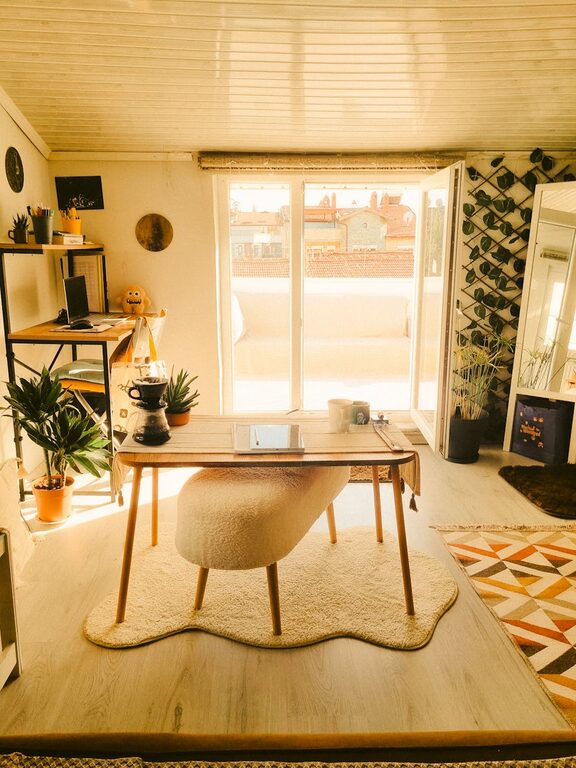
Creating a cozy and productive home office space is essential for maintaining focus, motivation, and comfort during work hours. Whether you’re working remotely full-time or just need a dedicated spot to handle personal tasks, the right setup can make all the difference. This guide offers practical tips to help you craft a home office that combines comfort with efficiency.
Choose the Right Location
Consider Natural Light
Natural light can improve mood and energy levels. Try to set up your desk near a window but avoid glare on your computer screen. If natural light is limited, invest in good quality lighting that mimics daylight.
Minimize Distractions
Pick a quiet corner or room where interruptions are minimal. Avoid spaces with heavy foot traffic or loud noises. This helps maintain concentration and decreases stress.
Select Comfortable and Functional Furniture
Invest in an Ergonomic Chair
Your chair is one of the most important pieces of furniture in your home office. Choose one that supports your lower back and promotes good posture to prevent discomfort during long work sessions.
Choose a Suitable Desk
Pick a desk size that fits your equipment and allows you to work comfortably without feeling cramped. Consider height-adjustable desks if you want the flexibility to alternate between sitting and standing.
Organize Your Workspace
Declutter Regularly
Keep your desk clear of unnecessary items. A tidy workspace helps to reduce distraction and lets you focus on your tasks.
Use Storage Solutions
Incorporate shelves, drawers, or filing cabinets to keep documents and supplies organized. Label your storage to find items quickly.
Personalize Your Space
Add Greenery
Plants can brighten your office and improve air quality. Choose low-maintenance varieties like succulents or snake plants if you don’t have a green thumb.
Decorate with Inspiring Items
Frame artwork, quotes, or photos that motivate you. Personal touches make your workspace inviting and help create a positive atmosphere.
Optimize Technology and Tools
Set Up Efficient Equipment
Ensure your computer, printer, and other devices are reliable and up to date. Use wireless accessories to reduce cable clutter.
Manage Cables
Use clips, ties, or cable organizers to keep cords neat and out of the way, which creates a cleaner appearance and prevents accidents.
Create Good Lighting
Layer Your Lighting
Combine ambient, task, and accent lighting. A desk lamp with adjustable brightness is useful for focused work, while soft overhead lights contribute to a cozy feel.
Avoid Harsh Lighting
Use bulbs that produce warm or natural white light instead of harsh fluorescents to reduce eye strain.
Control Temperature and Air Quality
Ensure Proper Ventilation
Good airflow keeps your space fresh and comfortable. Open windows when possible or use fans and air purifiers.
Maintain a Comfortable Temperature
Use heaters or fans as needed to keep your home office at a pleasant temperature year-round.
Develop a Routine and Boundaries
Set Work Hours
Having clear start and end times helps separate work from personal life, improving productivity and well-being.
Create a Ritual to Start Work
Simple habits like making a cup of tea or writing a to-do list can signal the beginning of your workday and help you focus.
—
By combining these tips, you can enjoy a home office that feels both cozy and productive. A well-designed space encourages focus, reduces stress, and makes working from home a more enjoyable experience. Start by assessing your current setup and make gradual improvements that suit your workflow and personal style.